Skip to content

Fatih Acar's blog

About of Database Systems and Information Technologies

Menu
  • Home
  • About Me
  • Contact Me
Menu

How to Use pg_rewind in PostgreSQL 12

Posted on 07/02/202007/02/2020 by Fatih Acar

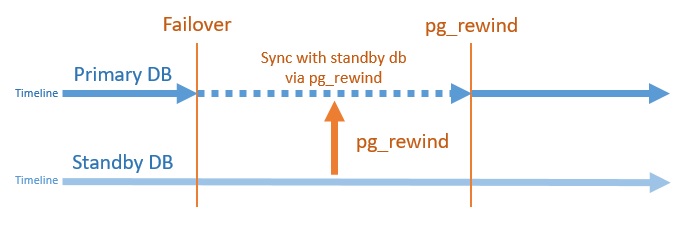
pg_rewind is a PostgreSQL tool since 9.5 version. It provides synchronization between standby and old primary. Especially, pg_rewind provides advantage for big databases. You can sync databases without using pg_basebackup.

pg_rewind scans the old primary database’s pgdata folder and identifies data blocks changed during the switch to standby database, then copies only changed blocks from relation files are copied; all other files are copied in full, including configuration files from promoted standby database. And the old primary database synchronize with applying changed blocks.
pg_rewind requires that the target server either has the wal_log_hints option enabled in postgresql.conf or data checksums enabled when database was initialized with initdb.

Also, you should be careful about configuration files. postgresql.conf,pg_hba.conf and postgresql.auto.conf files copied from the promoted standby database. You should configure access list of pg_hba, port information and primary_conninfo parameters.

Finally, you should create standby.signal file in data folder of old primary database before start of old primary database’s postgresql service.

TEST

I applied failover. And insert some test data to promoted standby database. Now I will sync promoted standby database and old primary database with pg_rewind.

Test Systems

Primary Database : 192.168.9.128 – 5432
Standby Database : 192.168.9.129 – 5433

PG_REWIND Steps

1 – Stop Old Primary Database

systemctl stop postgresql-pri.service

2- Run pg_rewind on Old Primary Database
Source : Promoted Standby Database
Target : Old Primary Database

su – postgres
pg_rewind –target-pgdata=/pgdata/12/data –source-server=”host=192.168.9.129 port=5433 user=postgres”
pg_rewind: servers diverged at WAL location 0/E0000D8 on timeline 1
pg_rewind: rewinding from last common checkpoint at 0/E000028 on timeline 1

pg_rewind: Done!

If you get an error about could not found WAL records, you can copy manually wal file from promoted standby database to old primary database’s pg_wal directory. If you do not want to get error message like above, you should configure restore_command parameter.

3- Create standby.signal File

touch standby.signal

4- Configure postgresql.auto.conf File on Old Primary Database
Change host and port parameter like below. These are promoted standby database information.

# Do not edit this file manually!
# It will be overwritten by the ALTER SYSTEM command.
primary_conninfo = ‘user=repuser password=yourpass host=192.168.9.129 port=5433 sslmode=prefer sslcompression=0 gssencmode=prefer krbsrvname=postgres target_session_attrs=any’

5- Configure postgresql.conf File on Old Primary Database

port = 5432

Also, If you use, you can configure archive_command and restore_command parameters.

6- Start Old Primary Database Service

systemctl start postgresql-pri.service

Finally, your old primary database is standby database now and follow up to promoted standby database. You can test :)

Source : postgresql.org

Share this:

  • Click to share on LinkedIn (Opens in new window) LinkedIn
  • Click to share on X (Opens in new window) X
  • Click to share on Facebook (Opens in new window) Facebook

Leave a Reply Cancel reply

Your email address will not be published. Required fields are marked *

Time limit is exhausted. Please reload CAPTCHA.


View Fatih ACAR's profile on LinkedIn

Categories

  • Databases (329)
    • MsSQL Server (18)
      • Administration (16)
      • Errors and Solutions (4)
      • SQL (2)
    • MySQL (5)
      • Administration (4)
      • Backup And Recovery (1)
      • Errors and Solutions (1)
    • Oracle (290)
      • Administration (79)
      • Backup And Recovery (29)
      • Errors and Solutions (195)
      • Procedure (10)
      • SQL (32)
    • PostgreSQL (16)
      • Administration (15)
      • Errors and Solutions (3)
      • SQL (2)
    • Redis (1)
  • Microsotf Dynamics CRM (1)
  • Operating Systems (47)
    • Linux & Unix (34)
    • Windows (13)
  • Programing (5)
    • Python (5)
  • SAP (15)
    • Errors and Solutions (4)
    • SAP Basis (12)
  • Security (8)
    • Database Security (6)
    • Information Security (1)
    • System Security (4)
  • VMware (4)

Recent Posts

  • Redis 7 Sentinel Infrastructure Installation
  • Oracle Database 19c Multi Data Guard and DML Redirect, Switchover-Failover Operations on Oracle Linux 8
  • Oracle Database 23ai Free Installation Steps on Oracle Linux 9
  • Oracle Database 19c Active Data Guard Installation and DML Redirect, Switchover-Failover Operations on Oracle Linux 8
  • Oracle Database 19c Installation and 19.22 RU Patch Apply on Oracle Linux 8

Resources

  • Oracle
  • PostgreSQL

Blogroll

  • Gökhan Atıl
  • H. Koray Gündüz
  • Hakan Talip Öztürk
  • Zekeriya Beşiroğlu

Web Pages

  • BT Çözümleri

Tag Cloud

Administration Backup and Recovery Cluster Systems Database Administration Database Security Linux Linux Administration MsSQL Server MsSQL Server Error and Solutions MySQL MySQL Administration ORA-00018 ORA-00020 Oracle Oracle 12c Oracle 19c Oracle Administration Oracle Backup and Restore Oracle Data Guard Oracle Data Guard Failover Oracle Data Guard Switchover Oracle Error Solutions Oracle Linux Oracle Rman Backup Oracle Security Oracle SQL Query PostgreSQL PostgreSQL Administration PostgreSQL High Availability PostgreSQL Hot Standby Python SAP Basis Sap Errors and Solutions Sap System Administration SQL SQL Server Administration SQL Server Availability Group Stored Procedure System Administration System Security VMware VMware Administration Windows Windows Batch Script Windows Server

Social

  • View facar1987’s profile on Twitter
  • View facar’s profile on LinkedIn

Subscribe to Blog via Email

Enter your email address to subscribe to this blog and receive notifications of new posts by email.

Join 17 other subscribers
©2026 Fatih Acar's blog | Built using WordPress and Responsive Blogily theme by Superb