I will explain how to install Oracle RAC 10g on Windows Server 2003 x64 Edition. I will tell installation step by step. You can find here for wide explain of that installation.
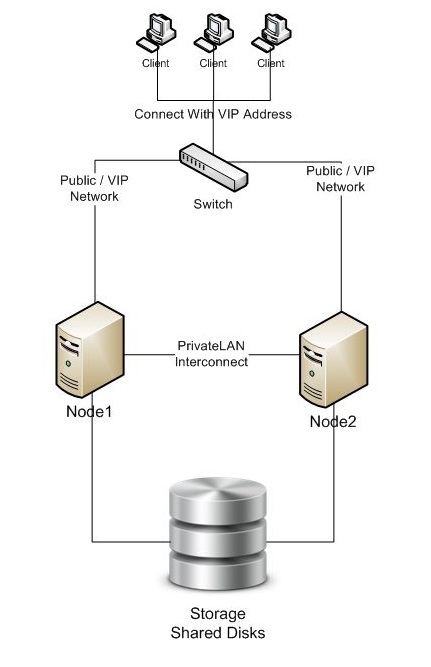
1 – VMware Configuration
- Add New Bridge Network.
- Add New Virtual Disks That 1 GB OCR, 1 GB Voting, 30 GB DATA, 30 GB DATA, 30 FRA on SCSI 1 (Different SCSI FROM Local Disk C (SCSI0)) on NODE1 and Set Virtual.
- Install Windows Server 2003.
2 – Windows Server 2003 Preconfiguration Before Oracle Installation
- Windows Update Complete.
- Vm Tool Install and Vm Tool Configuration Select Time Synchronization.
- Network Alias Set PublicLAN and PrivateLAN And Set IP Addresses, After PublicLAN Set Primary From Network Advanced Options.
- Regedit > HKEY_LOCAL_MACHINE\System\CurrentControlSet\Services\Tcpip\Parameters New DWORD > DisableDHCPMediaSense Value=1
- Change Computer Name Set NODE1
- Set Remote Connection Allow
- Create “oracle” User And Set Administrator Role
- Hosts File Write Usable VIP, Private and Physical IP Adres and Alias.
- Services.msc Distributed Transaction Coordinator Set Stop And Start Type Manual.
3 – Clone VM Machine and VM Configuration For NODE2
- Clone VM Machine And Set Name NODE2
- Delete Virtual Disk From SCSI 1
- Set Existing Virtual Disks From Node1 Disks on SCSI 1 on NODE2
4 – Windows Server 2003 Configuration For NODE2
- Change IP Addresses for Public and Private Connection.
- Change Computer Name Set NODE2.
- Check Hosts File.
- Check DisableDCHPMediaSense.
- Check Distributed Transaction Coordinator.
- Check VM Tool and Time Sync.
5 – Install Clusterware Software
- Run Cluvfy Batch Script For Check Your Configuration.
- Run clusterware/setup.exe
- Add Node2 Ip Addresses.
- Determine Private and Public Addresses.
- Determine Ocr, Voting Disks.
- Next For Complete Installation
- Run crs/BIN/vipca.bat For VIP IP Address Configuration.
6 – Install Lastest Patch
- Run Disk1/setup.exe
- Select Crs home
- Next For Complete Install
- Install patch102.bat
- Run Cluvfy For Clusterware Installation Check.
7 – Install ASM Software
- Run database/setup.exe
- Change Oracle Home, Set ASM.
- Select Two Nodes.
- Install Software Only.
- Next For Complete Installation.
8 – Install Lastest Patch
- Run Disk1/setup.exe
- Select ASM home
- Next For Complete Install
9 – Install Listener For ASM
- Run asm_1/BIN/netca
- Select Cluster Configuration.
- Next For Complete Install.
10 – Stamp Disks For ASM
- Run asm_1/BIN/asmtoolg.exe
- Select Data Label’s Disks.
- Set Alias DATA
- Next For Complete Install.
- Run asm_1/BIN/asmtoolg.exe
- Select Fra Label’s Disks.
- Set Alias FRA
- Next For Complete Install.
11 – Create ASM Instance
- Run asm_1/BIN/dbca
- Select Configure Automatic Storage Management.
- Set Passwords.
- Select Data and Fra Labels.
- Next For Complete Install.
12 – Install Oracle Software
- Run database/setup.exe
- Select Oracle Home (db_1)
- Select Two Nodes.
- Install Software Only.
- Next For Complete Installation.
13 – Install Lastest Patch
- Run Disk1/setup.exe
- Select DB home
- Next For Complete Install
14 – Create DB Instance
- Run db_1/BIN/dbca
- Select Create Database.
- Set SID.
- Set Passwords.
- Select ASM For Storage.
- Select DATA For Data Label.
- Select FRA For Flash Recovery Area.
- Next For Complete Install.
And Finish.
You can check your configuration with cluvfy. If you want to install Oracle RAC, you have to use this Document.