Skip to content

Fatih Acar's blog

About of Database Systems and Information Technologies

Menu
  • Home
  • About Me
  • Contact Me
Menu

MsSQL Server 2008 R2 Failover Cluster Installation on Windows Server 2008 R2 Enterprise x64 on VMware

Posted on 30/07/201216/08/2012 by Fatih Acar

Failover Cluster System Benefits

  • Protection at the instance level through redundancy
  • Automatic failover in the event of a failure (hardware failures, operating system failures, application or service failures)
  • Support for a broad array of storage solutions, including WSFC cluster disks (iSCSI, Fiber Channel, and so on) and server message block (SMB) file shares.
  • Disaster recovery solution using a multi-subnet FCI or running an FCI-hosted database inside an AlwaysOn availability group. With the new multi-subnet support in Microsoft SQL Server 2012, a multi-subnet FCI no longer requires a virtual LAN, increasing the manageability and security of a multi-subnet FCI.
  • Zero reconfiguration of applications and clients during failovers
  • Flexible failover policy for granular trigger events for automatic failovers
  • Reliable failovers through periodic and detailed health detection using dedicated and persisted connections
  • Configurability and predictability in failover time through indirect background checkpoints
  • Throttled resource usage during failovers
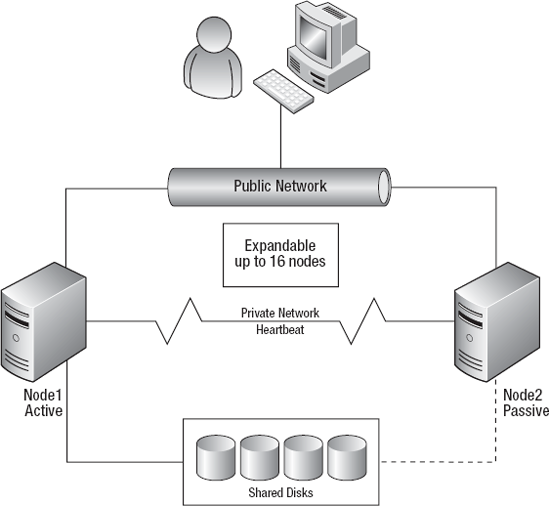

Preconfiguration on Windows Server For Failover Cluster

  • 2 Network Adaptor; First Adaptor for PublicLAN, Second Adaptor for Heartbeat Connection.
  • 7 IP Address for Cluster; 2 IP for PublicLAN, 2 IP for Heartbeat, 1 IP for Cluster, 1 IP for ClusterDtc, 1 IP for SQL Server Common Connection Address(ClusterNT)
  • 1 Disk for Local C disk each node. SCSI Bus Sharing have to be None, and Disk’s Mode have to be Persistent. SCSI Controller Type have to be SCSI Logic SAS
  • 3 RAW Disk for Sharing Disks; First Disk 1 GB for QUORUM, Second Disk 1 GB for MSDTC and Last Disk 100 GB for DATA. RAW disks’s SCSI Bus Sharing have to be Physical, and Disks’s Compatibility Mode have to be Physical. SCSI Controller Type have to be SCSI Logic SAS.
  • Create user on Active Directory and give domain admin privilage. User name can be sqlserver.
  • Create new organization unit (ou) for cluster machines.


Preconfiguration to Install Failover Cluster on Windows After Windows Server 2008 Installation

  • Add sqlserver user to Administrator group.
  • Make Network configuration for PublicLAN and Heartbeat, And make first network PublicLAN from Advanced Settings.
  • Add host ip addresses and alias to hosts file.
  • Shared Disks make online on each node. After Create Volume on each node. Aliases: Q -> QUORUM, M -> MSDTC, S -> DATA
  • Make Firewalls Disabled.
  • Windows update complated.

Install Failover Cluster

  • Install Failover Clustering from windows features on each node.
  • Install Application Server with incoming and ountgoing firewall from windows roles on each node.
  • Check Cluster Validation from Failover Cluster Manager.
  • If the checking is valid, you can click Create Cluster. (Cluster IP)
  • Configure Quorum Disk
  • Create MSDTC Service from Services and applications > Configure .. > Distributed Transaction Coordinator(DTC) (ClusterDtc IP)

Install MsSQL Server 2008 Failover Cluster

  • Click Setup form Installation on Node1
  • Choose Installation Failover Cluster

Add New Node

  • Click Setup form Installation on Node2
  • Choose Add Node

Share this:

  • Click to share on LinkedIn (Opens in new window) LinkedIn
  • Click to share on X (Opens in new window) X
  • Click to share on Facebook (Opens in new window) Facebook

Leave a Reply Cancel reply

Your email address will not be published. Required fields are marked *

Time limit is exhausted. Please reload CAPTCHA.


View Fatih ACAR's profile on LinkedIn

Categories

  • Databases (329)
    • MsSQL Server (18)
      • Administration (16)
      • Errors and Solutions (4)
      • SQL (2)
    • MySQL (5)
      • Administration (4)
      • Backup And Recovery (1)
      • Errors and Solutions (1)
    • Oracle (290)
      • Administration (79)
      • Backup And Recovery (29)
      • Errors and Solutions (195)
      • Procedure (10)
      • SQL (32)
    • PostgreSQL (16)
      • Administration (15)
      • Errors and Solutions (3)
      • SQL (2)
    • Redis (1)
  • Microsotf Dynamics CRM (1)
  • Operating Systems (47)
    • Linux & Unix (34)
    • Windows (13)
  • Programing (5)
    • Python (5)
  • SAP (15)
    • Errors and Solutions (4)
    • SAP Basis (12)
  • Security (8)
    • Database Security (6)
    • Information Security (1)
    • System Security (4)
  • VMware (4)

Recent Posts

  • Redis 7 Sentinel Infrastructure Installation
  • Oracle Database 19c Multi Data Guard and DML Redirect, Switchover-Failover Operations on Oracle Linux 8
  • Oracle Database 23ai Free Installation Steps on Oracle Linux 9
  • Oracle Database 19c Active Data Guard Installation and DML Redirect, Switchover-Failover Operations on Oracle Linux 8
  • Oracle Database 19c Installation and 19.22 RU Patch Apply on Oracle Linux 8

Resources

  • Oracle
  • PostgreSQL

Blogroll

  • Gökhan Atıl
  • H. Koray Gündüz
  • Hakan Talip Öztürk
  • Zekeriya Beşiroğlu

Web Pages

  • BT Çözümleri

Tag Cloud

Administration Backup and Recovery Cluster Systems Database Administration Database Security Linux Linux Administration MsSQL Server MsSQL Server Error and Solutions MySQL MySQL Administration ORA-00018 ORA-00020 Oracle Oracle 12c Oracle 19c Oracle Administration Oracle Backup and Restore Oracle Data Guard Oracle Data Guard Failover Oracle Data Guard Switchover Oracle Error Solutions Oracle Linux Oracle Rman Backup Oracle Security Oracle SQL Query PostgreSQL PostgreSQL Administration PostgreSQL High Availability PostgreSQL Hot Standby Python SAP Basis Sap Errors and Solutions Sap System Administration SQL SQL Server Administration SQL Server Availability Group Stored Procedure System Administration System Security VMware VMware Administration Windows Windows Batch Script Windows Server

Social

  • View facar1987’s profile on Twitter
  • View facar’s profile on LinkedIn

Subscribe to Blog via Email

Enter your email address to subscribe to this blog and receive notifications of new posts by email.

Join 17 other subscribers
©2026 Fatih Acar's blog | Built using WordPress and Responsive Blogily theme by Superb