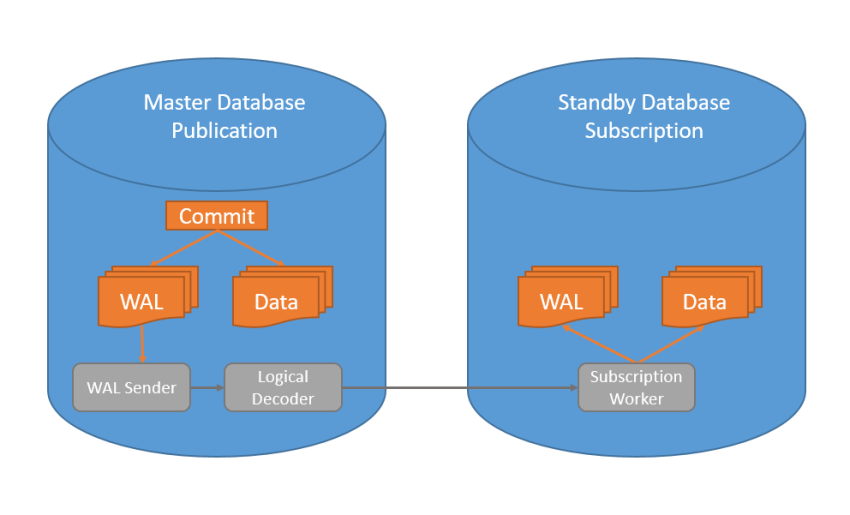
Logical Replication
wal_level=logical
For logical replication, the wal_level parameter must be logical in the postgresql.conf file . By default, the value of wal_level is replica . The replica value provides the necessary wal files for streaming replication . wal_level parameter is logical when set to , it allows adding the necessary wal information for logical replication to the wal information provided with the replica value. In other words, when you set the wal_level parameter as logical, it also includes the replica value and streaming replication can continue to work. When wal_level runs logically, the size of wal files grows. Parameter editing is done in both databases.
Example Database and Tables
postgres=# CREATE DATABASE testdb;
CREATE DATABASE
postgres=# \c testdb
You are now connected to database “testdb” as user “postgres”.
testdb=# CREATE TABLE person(person_id int, name text, surname text, gender text, PRIMARY KEY(person_id));
CREATE TABLE
testdb=# INSERT INTO person values (1,’Fatih’,’Acar’,’Male’);
INSERT 0 1
testdb=# INSERT INTO person values (2,’Ayşe’,’Fatma’,’Woman’);
INSERT 0 1
testdb=# INSERT INTO person values (3,’John’,’Jack’,’Male’);
INSERT 0 1
testdb=# select * from person;
person_id | name | surname | gender
———–+——-+———+——–
1 | Fatih | Acar | Male
2 | Ayse | Fatima | Woman
3 | Ahmet | Mehmet | Male
(3 rows)
Publication Creation
A publication is created by determining the desired fields of the table or tables to be used for logical replication.
postgres=# CREATE PUBLICATION pub_person FOR TABLE person (person_id, name, surname);
CREATE PUBLICATION
You can add a where condition to the query as follows to add a row-based filter in the publicized table.
CREATE PUBLICATION pub_person FOR TABLE person (person_id, name, surname) where (gender=’Male’);
If you want to include all tables in the publication scope, you can use the following query.
CREATE PUBLICATION pub_tables FOR ALL TABLES;
If you want to include certain tables in the scope of publication with all their fields, you can use the following query.
CREATE PUBLICATION pub_tablo123 FOR TABLE table1,table2,table3;
Replication User
There is a need for a user that has been created specifically for replication and has authorization to the tables to be replicated. For example, the repuser user can be created as follows.
[postgres@btcozumleri ~]$ createuser -p 5432 repuser -P –replication
postgres=# GRANT ALL ON person TO repuser;
GRANT
Subscription Creation
A table is created in the standby database to be the same as the columns specified in the publication in the master database.
postgres=# CREATE DATABASE testdb;
CREATE DATABASE
postgres=# \c testdb;
You are now connected to database “testdb” as user “postgres”.
testdb=# CREATE TABLE person(person_id int, name text, surname text, PRIMARY KEY(person_id));
CREATE TABLE
testdb=# CREATE SUBSCRIPTION sub_person CONNECTION ‘host=localhost dbname=testdb user=repuser password=123456 application_name=sub_person’ PUBLICATION pub_person;
NOTICE: created replication slot “sub_person” on publisher
CREATE SUBSCRIPTION
postgres=# \c testdb
You are now connected to database “testdb” as user “postgres”.
testdb=# select * from person;
person_id | name | surname
———–+——+———
1 | Fatih | Acar
2 | Ayse | Fatma
3 | Ahmet | Mehmet
(3 rows)
Data came into the standby database. You can perform test operations by adding and removing data from the master database.
select * from pg_replication_slots; You can list replication slots that are open on the master side.
Source : https://btcozumleri.com/postgresql-tablo-ve-kolon-bazli-logical-replication/