Skip to content

Fatih Acar's blog

About of Database Systems and Information Technologies

Menu
  • Home
  • About Me
  • Contact Me
Menu

SAP Security Audit Log Activation

Posted on 04/02/201404/02/2014 by Fatih Acar

As of Release 4.0, you can use the Security Audit Log to record security-related system information such as changes to user master records or unsuccessful logon attempts. This log is a tool designed for auditors who need to take a detailed look at what occurs in the SAP System. By activating the audit log, you keep a record of those activities that you specify for your audit. You can then access this information for evaluation in the form of an audit analysis report.
The Security Audit Log provides for long-term data access. The audit files are retained until you explicitly delete them. Currently, the Security Audit Log does not support the automatic archiving of the log files; however, you can manually archive them at any time.

SAP Security Audit Log

You can record the following information in the Security Audit Log

  • Successful and unsuccessful dialog logon attempts
  • Successful and unsuccessful RFC logon attempts
  • RFC calls to function modules
  • Changes to user master records
  • Successful and unsuccessful transaction starts
  • Changes to the audit configuration

SAP Security Audit Log Activation Steps

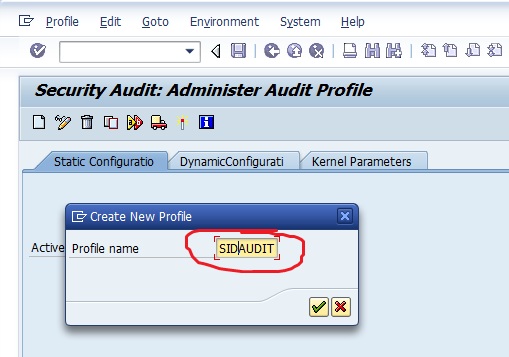
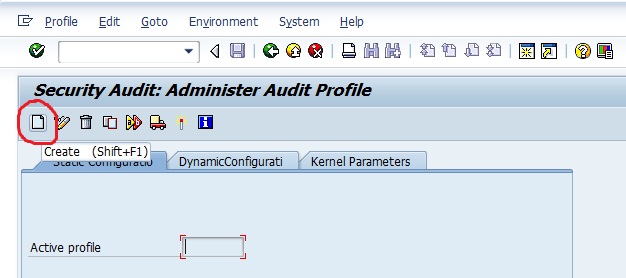
1 – Create Profile

Tcode > SM19

SAP Security Audit Log 1
SAP Security Audit Log 2


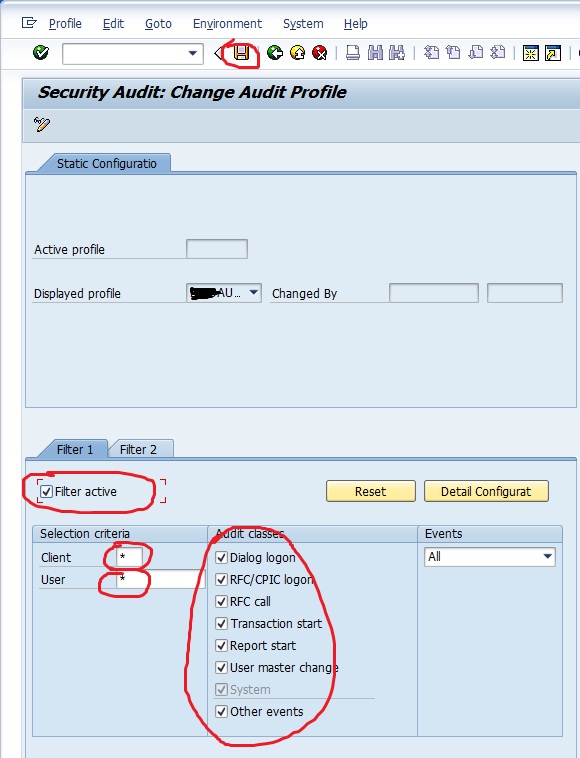
2 – Active Filter

Tcode > SM19

You can choose audit criteria with Filters.

SAP Security Audit Log 3
SAP Security Audit Log 3-2

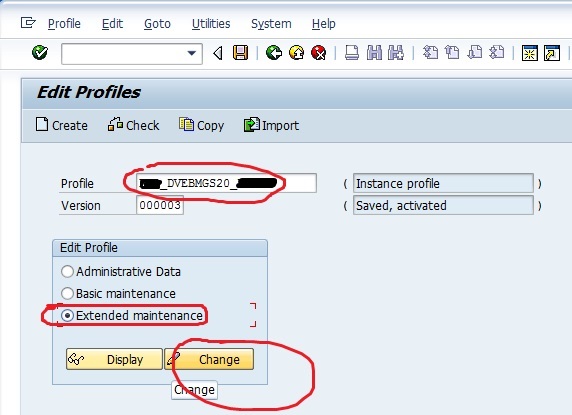
3 – Profile Configuration

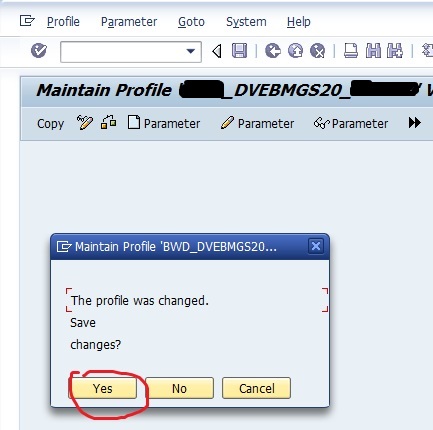
Tcode > RZ10

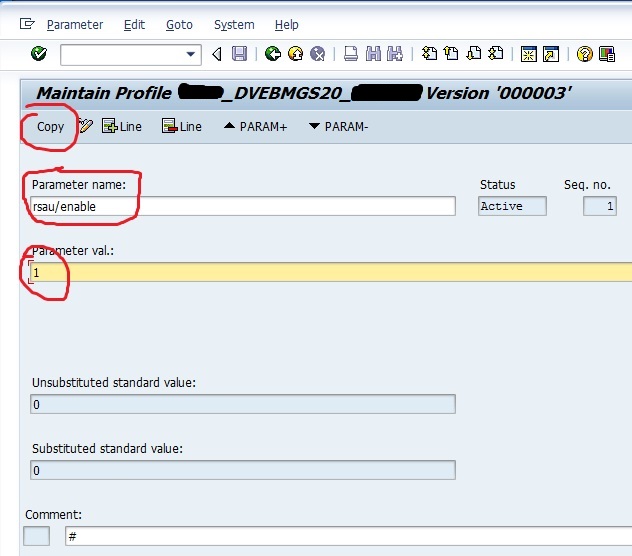
You have to set rsau/enable parameter to 1 to active security audit log for all time.

SAP Security Audit Log 4
SAP Security Audit Log 5
SAP Security Audit Log 6

SAP Security Audit Log 7

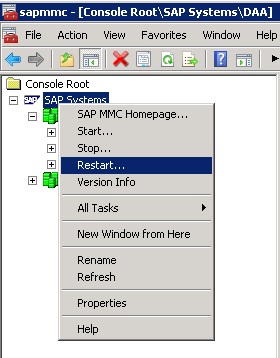
You have to restart SAP Instances to active profile changes.
SAP Security Audit Log 8

You can show audit logs with tcode SM20 , You can delete old logs with the transaction SM18 .
Source : SAP Offical Documents

Share this:

  • Click to share on LinkedIn (Opens in new window) LinkedIn
  • Click to share on X (Opens in new window) X
  • Click to share on Facebook (Opens in new window) Facebook

2 thoughts on “SAP Security Audit Log Activation”

  1. Delana Travieso says:
    20/10/2014 at 19:32

    Thanks a lot for providing individuals with a very breathtaking possiblity to read critical reviews from this web site. It is usually very lovely plus stuffed with a lot of fun for me and my office fellow workers to visit your web site really 3 times every week to read the latest secrets you have got. And of course, we’re at all times motivated with all the great suggestions you serve. Certain 3 areas in this article are undeniably the best I’ve had.

    Reply
  2. ElviaX says:
    25/06/2017 at 07:36

    I must say you have high quality content here. Your content should go viral.

    You need initial traffic only. How to get massive traffic?

    Search for; Murgrabia’s tools go viral

    Reply

Leave a Reply Cancel reply

Your email address will not be published. Required fields are marked *

Time limit is exhausted. Please reload CAPTCHA.


View Fatih ACAR's profile on LinkedIn

Categories

  • Databases (329)
    • MsSQL Server (18)
      • Administration (16)
      • Errors and Solutions (4)
      • SQL (2)
    • MySQL (5)
      • Administration (4)
      • Backup And Recovery (1)
      • Errors and Solutions (1)
    • Oracle (290)
      • Administration (79)
      • Backup And Recovery (29)
      • Errors and Solutions (195)
      • Procedure (10)
      • SQL (32)
    • PostgreSQL (16)
      • Administration (15)
      • Errors and Solutions (3)
      • SQL (2)
    • Redis (1)
  • Microsotf Dynamics CRM (1)
  • Operating Systems (47)
    • Linux & Unix (34)
    • Windows (13)
  • Programing (5)
    • Python (5)
  • SAP (15)
    • Errors and Solutions (4)
    • SAP Basis (12)
  • Security (8)
    • Database Security (6)
    • Information Security (1)
    • System Security (4)
  • VMware (4)

Recent Posts

  • Redis 7 Sentinel Infrastructure Installation
  • Oracle Database 19c Multi Data Guard and DML Redirect, Switchover-Failover Operations on Oracle Linux 8
  • Oracle Database 23ai Free Installation Steps on Oracle Linux 9
  • Oracle Database 19c Active Data Guard Installation and DML Redirect, Switchover-Failover Operations on Oracle Linux 8
  • Oracle Database 19c Installation and 19.22 RU Patch Apply on Oracle Linux 8

Resources

  • Oracle
  • PostgreSQL

Blogroll

  • Gökhan Atıl
  • H. Koray Gündüz
  • Hakan Talip Öztürk
  • Zekeriya Beşiroğlu

Web Pages

  • BT Çözümleri

Tag Cloud

Administration Backup and Recovery Cluster Systems Database Administration Database Security Linux Linux Administration MsSQL Server MsSQL Server Error and Solutions MySQL MySQL Administration ORA-00018 ORA-00020 Oracle Oracle 12c Oracle 19c Oracle Administration Oracle Backup and Restore Oracle Data Guard Oracle Data Guard Failover Oracle Data Guard Switchover Oracle Error Solutions Oracle Linux Oracle Rman Backup Oracle Security Oracle SQL Query PostgreSQL PostgreSQL Administration PostgreSQL High Availability PostgreSQL Hot Standby Python SAP Basis Sap Errors and Solutions Sap System Administration SQL SQL Server Administration SQL Server Availability Group Stored Procedure System Administration System Security VMware VMware Administration Windows Windows Batch Script Windows Server

Social

  • View facar1987’s profile on Twitter
  • View facar’s profile on LinkedIn

Subscribe to Blog via Email

Enter your email address to subscribe to this blog and receive notifications of new posts by email.

Join 17 other subscribers
©2026 Fatih Acar's blog | Built using WordPress and Responsive Blogily theme by Superb