Skip to content

Fatih Acar's blog

About of Database Systems and Information Technologies

Menu
  • Home
  • About Me
  • Contact Me
Menu

SQL Server 2012 AlwaysOn Availability Groups Insallation and Configuration

Posted on 11/10/201623/08/2019 by Fatih Acar

Always On Availability Group is a new feature in SQL Server Database with 2012 release. Before this feature, we was using database mirroring feature in SQL Server 2005. But, mirroring has some limitations and weaknesses. and mirroring feature will be disabled near future.

AlwaysOn Availability Groups Features

  • Multi or Single Database Failovers
  • Multiple Secondaries
  • Active (Readably) Secondaries
  • Integrated HA Management

sqlserveravailabilitygroup

System Information

OS: Windows 2012 Server
DB: SQL Server 2012
Side 1: TESTDB1
Side 2: TESTDB2
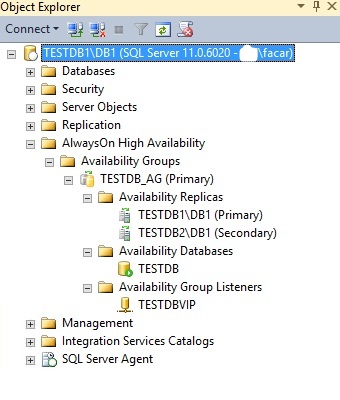
Failover Cluster Name: TESTDB
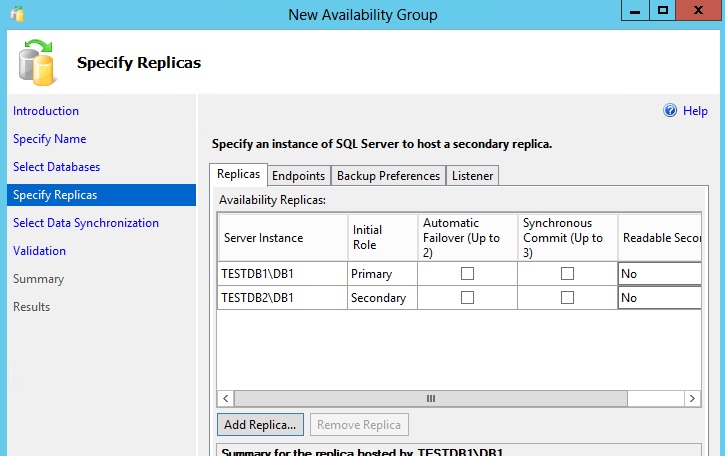
Availability Group Name: TESTDB_AG
Listener Name: TESTDBVIP
Listener Port: 1433

AlwaysOn Availability Groups Installation Steps

  • Take Domain all sides and connect with domain admin user.
  • Install Failover Clustering feature on all sides.
  • Create Failover Cluster with exclude shared disk (uncheck “Add all eligible storage to the cluster”) on first side with domain admin user.
  • Add windows user as Administrator from domain to Operating System like domain\facar on all sides.
  • Connect to operating system with domain\facar user for installation.
  • Install SQL Server Database with the same Instance name on all sides. (Note : Use SQL_Latin1_General_CP1_CI_AS collation due to you can get an error when creating AG at listener service.)
  • Check Enable AlwaysOn Availability Groups (Sql Server Configuration Manager > SQL Server Services > SQL Server (DBNAME) Properties > AlwaysOn High Availability > Check Enable AlwaysOn Availability Groups) on all sides and restart SQL Server service on all sides.
  • Create user on SQL Server Database with Operating System user domain\facar with sysadmin privilege on all sides.
  • Open services.msc and change SQL Server service Log On account domain\facar user and restart service on all sides.
  • Create folder like E:\Backup and share for backup and t-log transport. You have to reach with \\TESTDB1\Backup
  • Take full backup of database that you want to use for failover.
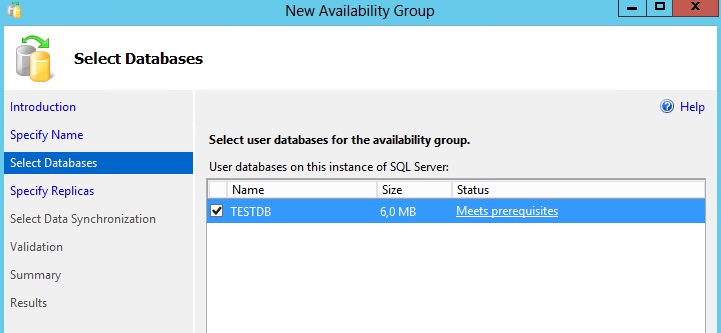
  • Create New Availability Group on first side.
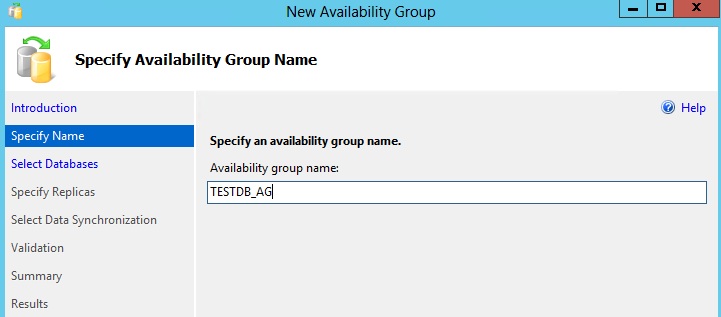
sql_availability_group1

sql_availability_group2

sql_availability_group3

sql_availability_group4

sql_availability_group5

sql_availability_group6

sql_availability_group7

sql_availability_group8

sql_availability_group9

sql_availability_group10

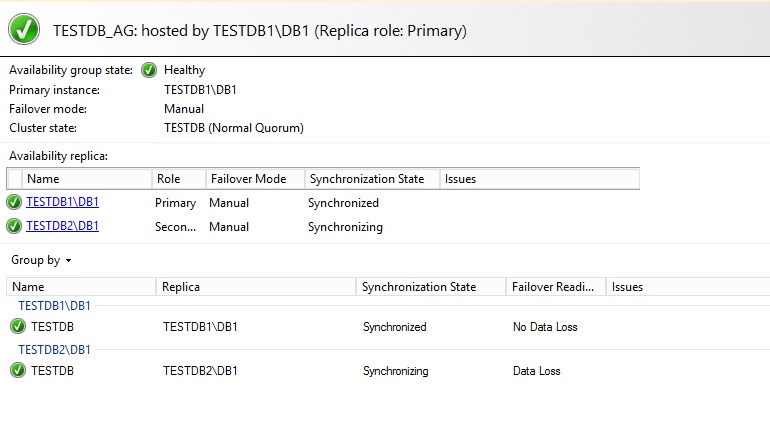
After all steps, you can test your database to control whether your operations flow into second side or not.

You can find how to force manual failover Availabiliry Group here : http://www.fatihacar.com/blog/mssql-server-2012-availability-groups-ag-force-manual-failover/

Share this:

  • Click to share on LinkedIn (Opens in new window) LinkedIn
  • Click to share on X (Opens in new window) X
  • Click to share on Facebook (Opens in new window) Facebook

Leave a Reply Cancel reply

Your email address will not be published. Required fields are marked *

Time limit is exhausted. Please reload CAPTCHA.


View Fatih ACAR's profile on LinkedIn

Categories

  • Databases (329)
    • MsSQL Server (18)
      • Administration (16)
      • Errors and Solutions (4)
      • SQL (2)
    • MySQL (5)
      • Administration (4)
      • Backup And Recovery (1)
      • Errors and Solutions (1)
    • Oracle (290)
      • Administration (79)
      • Backup And Recovery (29)
      • Errors and Solutions (195)
      • Procedure (10)
      • SQL (32)
    • PostgreSQL (16)
      • Administration (15)
      • Errors and Solutions (3)
      • SQL (2)
    • Redis (1)
  • Microsotf Dynamics CRM (1)
  • Operating Systems (47)
    • Linux & Unix (34)
    • Windows (13)
  • Programing (5)
    • Python (5)
  • SAP (15)
    • Errors and Solutions (4)
    • SAP Basis (12)
  • Security (8)
    • Database Security (6)
    • Information Security (1)
    • System Security (4)
  • VMware (4)

Recent Posts

  • Redis 7 Sentinel Infrastructure Installation
  • Oracle Database 19c Multi Data Guard and DML Redirect, Switchover-Failover Operations on Oracle Linux 8
  • Oracle Database 23ai Free Installation Steps on Oracle Linux 9
  • Oracle Database 19c Active Data Guard Installation and DML Redirect, Switchover-Failover Operations on Oracle Linux 8
  • Oracle Database 19c Installation and 19.22 RU Patch Apply on Oracle Linux 8

Resources

  • Oracle
  • PostgreSQL

Blogroll

  • Gökhan Atıl
  • H. Koray Gündüz
  • Hakan Talip Öztürk
  • Zekeriya Beşiroğlu

Web Pages

  • BT Çözümleri

Tag Cloud

Administration Backup and Recovery Cluster Systems Database Administration Database Security Linux Linux Administration MsSQL Server MsSQL Server Error and Solutions MySQL MySQL Administration ORA-00018 ORA-00020 Oracle Oracle 12c Oracle 19c Oracle Administration Oracle Backup and Restore Oracle Data Guard Oracle Data Guard Failover Oracle Data Guard Switchover Oracle Error Solutions Oracle Linux Oracle Rman Backup Oracle Security Oracle SQL Query PostgreSQL PostgreSQL Administration PostgreSQL High Availability PostgreSQL Hot Standby Python SAP Basis Sap Errors and Solutions Sap System Administration SQL SQL Server Administration SQL Server Availability Group Stored Procedure System Administration System Security VMware VMware Administration Windows Windows Batch Script Windows Server

Social

  • View facar1987’s profile on Twitter
  • View facar’s profile on LinkedIn

Subscribe to Blog via Email

Enter your email address to subscribe to this blog and receive notifications of new posts by email.

Join 17 other subscribers
©2026 Fatih Acar's blog | Built using WordPress and Responsive Blogily theme by Superb