Unified Auditing is new audit feature came with Oracle 12c version. You have to do enable Unified Auditing to use after install database. Unified Auditing come as disabled by default.
In previous releases of Oracle Database, there were separate audit trails for individual components:
- SYS.AUD$ for the database audit trail,
- SYS.FGA_LOG$ for fine-grained auditing,
- DVSYS.AUDIT_TRAIL$ for Oracle Database Vault, Oracle Label Security, and so on.
In 12c, these audit trails are all unified into one, viewable from the UNIFIED_AUDIT_TRAIL data dictionary view for single-instance installations or Oracle Database Real Application Clusters environments.
Auditable Components With Unified Auditing
- Audit Any Role
- Application Context Values
- Oracle Database Real Application Security Events
- Oracle Recovery Manager Events
- Oracle Database Vault Events
- Oracle Label Security Events
- Oracle Data Mining Events
- Oracle Data Pump Events
- Oracle SQL*Loader Direct Load Path Events
- Operating System Audit Records into the Unified Audit Trail
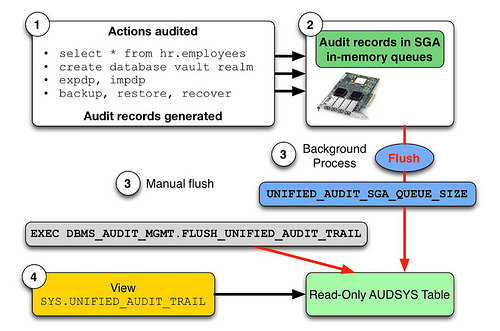
The unified audit trail, which resides in a read-only table in the AUDSYS schema in the SYSAUX tablespace, makes this information available in a uniform format in the UNIFIED_AUDIT_TRAIL data dictionary view, and is available in both single-instance and Oracle Database Real Application Clusters environments. In addition to the user SYS, users who have been granted the AUDIT_ADMIN and AUDIT_VIEWER roles can query these views. If your users only need to query the views but not create audit policies, then grant them the AUDIT_VIEWER role.
When the database is writeable, audit records are written to the unified audit trail. If the database is not writable, then audit records are written to new format operating system files in the $ORACLE_BASE/audit/$ORACLE_SID directory.
You can use mixed mode auditing enables both traditional (that is, the audit facility from releases earlier than Release 12c) and the new audit facilities (unified auditing). In mixed mode, you can use the new unified audit facility alongside the traditional auditing facility. In pure unified auditing, you only use the unified audit facility.
As in previous releases, the traditional audit facility is driven by the AUDIT_TRAIL initialization parameter. Only for mixed mode auditing, you should set this parameter to the appropriate traditional audit trail. This traditional audit trail will then be populated with audit records, along with the unified audit trail. When you upgrade your database to the current release, traditional auditing is preserved, and the new audit records are written to the traditional audit trail.
Enable Unified Auditing
You can check current status with below query.
SQL> SELECT VALUE FROM V$OPTION WHERE PARAMETER='Unified Auditing';If VALUE is TRUE, Unified Auditing is enabled.
You have to shutdown all running database process (database,listener) to activate Unified Auditing before run script. If you use Oracle RAC, you have to run script on all of nodes.
SQL> shutdown immediate;
SQL> exit;

[oracle@testdb ~]$ lsnrctl stop LISTENER

[oracle@testdb ~]$ cd $ORACLE_HOME/rdbms/lib/
[oracle@testdb lib]$ make -f ins_rdbms.mk uniaud_on ioracle ORACLE_HOME=$ORACLE_HOME

SQL> startup;
SQL> SELECT VALUE FROM V$OPTION WHERE PARAMETER='Unified Auditing';
The VALUE has to be TRUE.
Audit Write Modes
Audit logs can be written to datafile with two different modes.
- Queued Write Mode (Default Mode) : You might loose some audit data in case of instance crash (data which was not flushed to disk at time of instance crash). You can use to improve audit performance.
- Immediate Write Mode : This will ensure no audit data is lost. The audit records are written immediately.
If you want to change write mode, you can use below queries.
To write as immediately.
SQL> EXEC DBMS_AUDIT_MGMT.SET_AUDIT_TRAIL_PROPERTY(-
DBMS_AUDIT_MGMT.AUDIT_TRAIL_UNIFIED, -
DBMS_AUDIT_MGMT.AUDIT_TRAIL_WRITE_MODE, -
DBMS_AUDIT_MGMT.AUDIT_TRAIL_IMMEDIATE_WRITE);
To write as queued.
SQL> EXEC DBMS_AUDIT_MGMT.SET_AUDIT_TRAIL_PROPERTY(-
DBMS_AUDIT_MGMT.AUDIT_TRAIL_UNIFIED, -
DBMS_AUDIT_MGMT.AUDIT_TRAIL_WRITE_MODE, -
DBMS_AUDIT_MGMT.AUDIT_TRAIL_QUEUED_WRITE);
You can manually flush memory and write to datafile audit logs with below query.
SQL> EXEC DBMS_AUDIT_MGMT.FLUSH_UNIFIED_AUDIT_TRAIL;
Display Default Active Policies
You can show active policies from audit_unified_enabled_policies;
SQL> SELECT POLICY_NAME FROM AUDIT_UNIFIED_ENABLED_POLICIES;

ORA_SECURECONFIG
ORA_LOGON_FAILURES
ORA_SECURECONFIG and ORA_LOGON_FAILURES are default active policies.
You can use audit_unified_policies to display content of policies. Also, you can use to display all created policies.SQL> SELECT POLICY_NAME, AUDIT_OPTION FROM AUDIT_UNIFIED_POLICIES WHERE POLICY_NAME = 'ORA_SECURECONFIG';
Create New Policy
You can use below query to audit datapump export operations with unified auditing. I can create a policy to fetch this operation.
SQL> CREATE AUDIT POLICY AUD_DATAPUMP ACTIONS COMPONENT=DATAPUMP EXPORT;You can use below query to audit select,update,insert,delete operation on hr.salary table.
SQL> CREATE AUDIT POLICY AUD_SUID_SALARY ACTIONS SELECT,INSERT,UPDATE,DELETE ON HR.SALARY;You can use below query to audit who used certain role like AUDIT_VIEWER.
SQL> CREATE AUDIT POLICY AUD_USE_AUDIT_VIEWER ROLES AUDIT_VIEWER;
Enable Policy
To make active AUD_DATAPUMP policy for all users.
SQL> AUDIT POLICY AUD_DATAPUMP;For certain users.
SQL> AUDIT POLICY AUD_DATAPUMP BY FACAR;For all users except HR user.
SQL> AUDIT POLICY AUD_DATAPUMP EXCEPT HR;
Display Unified Audit Logs
You can use unified_audit_trail to display audited logs.
SQL> SELECT * FROM UNIFIED_AUDIT_TRAIL;
Clean Old Unified Audit Logs
Manual Clean
You can use remove old than 7 days unified audit logs with below queries.
SQL> EXEC DBMS_AUDIT_MGMT.SET_LAST_ARCHIVE_TIMESTAMP ( -
AUDIT_TRAIL_TYPE  => DBMS_AUDIT_MGMT.AUDIT_TRAIL_UNIFIED, -
LAST_ARCHIVE_TIME => SYSDATE-7);

SQL> EXEC DBMS_AUDIT_MGMT.CLEAN_AUDIT_TRAIL( -
AUDIT_TRAIL_TYPE        => DBMS_AUDIT_MGMT.AUDIT_TRAIL_UNIFIED, -
USE_LAST_ARCH_TIMESTAMP => TRUE);
Schedule Clean
You can use remove old than 7 days unified audit logs as schedule with below queries.
SQL> EXEC DBMS_AUDIT_MGMT.SET_LAST_ARCHIVE_TIMESTAMP ( -
AUDIT_TRAIL_TYPE => DBMS_AUDIT_MGMT.AUDIT_TRAIL_UNIFIED, -
LAST_ARCHIVE_TIME => SYSDATE-7);

SQL> EXEC DBMS_AUDIT_MGMT.CREATE_PURGE_JOB (-
AUDIT_TRAIL_TYPE => DBMS_AUDIT_MGMT.AUDIT_TRAIL_UNIFIED, -
AUDIT_TRAIL_PURGE_INTERVAL => 1, -
AUDIT_TRAIL_PURGE_NAME => 'AUDIT_PURGE_1_HOUR_SCHEDULE', -
USE_LAST_ARCH_TIMESTAMP => TRUE);
You can view job executes details from DBA_SCHEDULER_JOB_RUN_DETAILS view.
SQL> SELECT JOB_NAME,STATUS,ACTUAL_START_DATE FROM DBA_SCHEDULER_JOB_RUN_DETAILS WHERE JOB_NAME='AUDIT_PURGE_1_HOUR_SCHEDULE';
Disable Policy
To make disable AUD_DATAPUMP policy for all users.
SQL> NOAUDIT POLICY AUD_DATAPUMP;For certain users.
SQL> NOAUDIT POLICY AUD_DATAPUMP BY FACAR;
Drop Policy
Policy has not to be active to drop.
SQL> DROP POLICY AUD_DATAPUMP;
Disable Unified Auditing
You have to shutdown all database processes (database,listener) to disable Unified Auditing before run script. If you use Oracle RAC, you have to run script on all of nodes.
SQL> shutdown immediate;
SQL> exit;

[oracle@testdb ~]$ lsnrctl stop LISTENER

[oracle@testdb ~]$ cd $ORACLE_HOME/rdbms/lib/
[oracle@testdb lib]$ make -f ins_rdbms.mk uniaud_off ioracle ORACLE_HOME=$ORACLE_HOME

SQL> startup;
SQL> SELECT VALUE FROM V$OPTION WHERE PARAMETER='Unified Auditing';
The VALUE has to be FALSE.
Sources : Oracle Offical Documents, Oracle Blog, Oracle Community
The work of dynamic data masking is to protect personally identifiable data. Dynamic data masking does not require any additional server resources.